
“Screen,” “monitor,” and “display” are often used interchangeably, especially when talking about computers, phones, and televisions. However, they do not always mean the same thing. Understanding the differences can help you choose the right word in everyday conversation, technical writing, education, business, and technology contexts and avoid confusing a specific device with the visual surface or technology it uses.
Comparison Overview
Screen, monitor, and display are closely related technology terms, but each has a slightly different meaning.
- Screen usually refers to the visible surface or area where images, text, and video appear.
- Monitor usually refers to a complete external computer display device.
- Display is the broadest and most technical term. It can refer to the visual output itself, the panel that produces it, or a complete display device depending on context.
For example, when you say, “My monitor is on the desk,” you are talking about a physical computer device. When you say, “The screen is cracked,” you are usually referring to the visible panel or surface. When you say, “This phone has a high-resolution display,” you are describing the technology or visual component that produces the image.
| Term | Basic meaning | Usually refers to | Common contexts |
| Screen | Surface/area where visual information appears | Visible image area or panel | Phones, TVs, laptops, general conversation |
| Monitor | A dedicated visual output device | External computer display | PCs, offices, gaming, design |
| Display | A general term for visual output or display technology | Panel, system, or visual output | Technical, electronics, specifications |
The most important point is that these words overlap. They are not three completely separate types of technology.
Definition of Screen
A screen is the part of a device on which visual information is shown.
It may display:
- Text
- Images
- Videos
- Menus
- Applications
- Graphics
- Games
- Websites
You can find screens on smartphones, tablets, laptops, televisions, cars, ATMs, digital cameras, and many other devices.
Core meaning of screen
The central idea behind a screen is the visible area where something appears.
For example:
“The phone screen is too bright.”
Here, screen refers to the visible part of the phone where the image appears.
Similarly:
“There is a scratch on my laptop screen.”
The speaker is focusing on the physical viewing surface.
Screen as a verb
Screen can also be a verb, although this meaning is different from the technology meaning.
As a verb, screen can mean:
- To show a movie or program
- To examine or filter something
- To protect something with a barrier
Examples:
“The cinema will screen the movie tonight.”
“The company screens applicants before interviews.”
Therefore, screen is both a noun and a verb, depending on context.
Definition of Monitor
A monitor is a device used to display visual information, especially when connected to a computer.
A traditional desktop computer setup might contain:
- Computer tower
- Monitor
- Keyboard
- Mouse
- Speakers
The monitor receives visual information from the computer and presents it to the user.
Core meaning of monitor
In everyday technology language, monitor usually means a dedicated external display device.
For example:
“I bought a new 27-inch monitor for my computer.”
The word monitor identifies the device itself.
Monitor as a verb
Monitor is also a verb.
As a verb, it means to observe, check, or track something over time.
Examples:
“The doctor monitored the patient’s temperature.”
“The manager monitors the project’s progress.”
This meaning has nothing specifically to do with computer monitors.
Monitor as a noun outside technology.
A monitor can also refer to a person or system that observes something.
For example:
“The exam monitor asked everyone to remain quiet.”
So the word monitor has several meanings, but in computer terminology it normally means a dedicated visual display device.
Definition of Display
Display is a broad term referring to the presentation of visual information or the technology/device used to present it.
In technology, you might see the word display in specifications such as:
- Display size
- Display resolution
- Display panel
- Display brightness
- Display technology
- Display refresh rate
For example:
“The laptop has a 15.6-inch display.”
Here, display refers to the visual component of the laptop.
Core meaning of display
The fundamental idea of display is showing or presenting information.
It is therefore broader than screen in many technical contexts.
For example:
“The display shows the current temperature.”
This could describe the visual output of a phone, smartwatch, appliance, vehicle dashboard, or computer.
Display as a verb
Display is also a verb meaning to show something visibly.
Examples:
“The screen displays the current time.”
“The website displays a warning message.”
So, like screen and monitor, display can function as a noun. Or a verb, but its meanings differ.
Main Differences Between Screen, Monitor, and Display
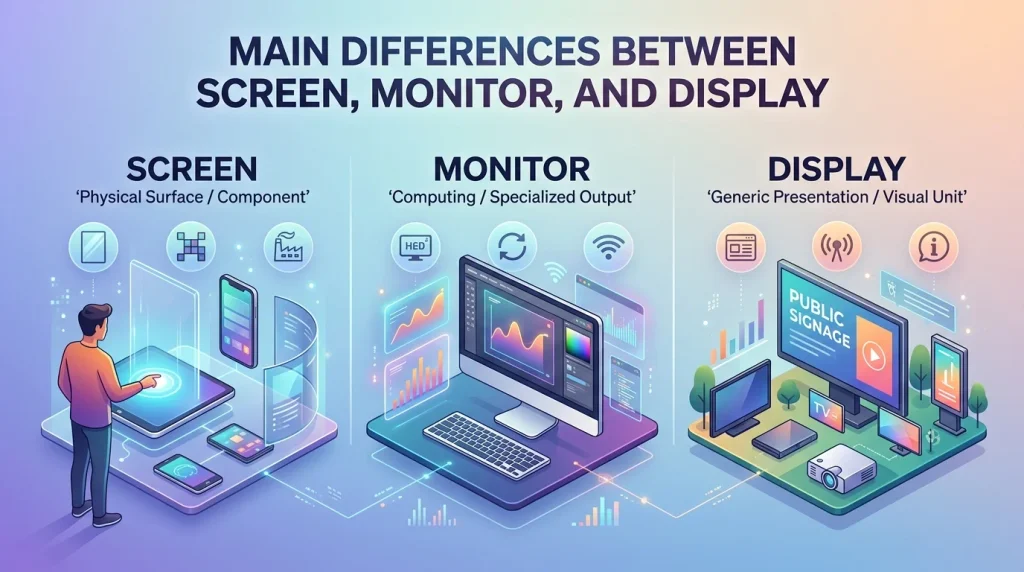
The easiest way to understand these terms is to focus on what each word emphasizes.
Screen focuses on the visible surface
Screen commonly emphasizes the area you look at.
“My screen is cracked.”
The concern is the visible surface.
Monitor focuses on the device.
Monitor commonly emphasizes a dedicated piece of hardware.
“I connected two monitors to my computer.”
The concern is the external hardware devices.
Display focuses on showing information or display technology
Display can emphasize the technology, panel, visual output, or act of showing information.
“This phone has an OLED display.”
Here, display sounds natural because the sentence discusses display technology.
A simple comparison
Think about a desktop computer:
Computer → Monitor → Screen/Display
This isn’t a strict technical hierarchy in every situation, but it is a useful beginner-friendly way to understand the distinction.
The monitor is the device.
The screen is the visible viewing area.
The display can refer broadly to the visual component or the technology that produces the image.
Screen vs Monitor vs Display in Technology
Technology is where these three words overlap the most.
Desktop computers
For a desktop PC, monitor is usually the most precise term when talking about the external device.
“I need a larger monitor.”
However, people commonly say:
“I need a larger screen.”
Both can be understood, but monitor specifically identifies the computer display device.
Laptops
For laptops, screen and display are extremely common.
“My laptop screen is broken.”
“This laptop has a high-resolution display.”
Calling the laptop’s built-in panel a monitor is generally less natural.
Smartphones
For smartphones, screen and display are common.
“The screen is cracked.”
“The phone has a 120 Hz display.”
Calling the entire smartphone’s visual panel a monitor would usually sound unnatural.
Televisions
People normally say TV screen or TV display.
“The TV screen is huge.”
“The television has a bright display.”
Monitor is generally associated more strongly with computers, although some computer monitors can also be used for entertainment.
Screen vs Display: Are They the Same?
Sometimes, yes.
In ordinary conversation, screen and display can refer to essentially the same physical component.
For example:
“The phone screen is damaged.”
and
“The phone display is damaged.”
can communicate almost the same idea.
However, display often sounds more technical or specification-oriented.
Compare:
“The screen looks great.”
with:
“The display supports a 120 Hz refresh rate.”
The first is everyday language. The second sounds more technical.
Monitor vs Display: Are They the Same?
Not always.
A monitor is generally a complete visual output device, particularly an external computer display.
A display can refer to the panel or visual technology inside a device.
For example:
“The monitor has a 27-inch display.”
In this sentence, the monitor is the complete device, while the display describes its visual component.
However, manufacturers and users may sometimes use display to refer to the complete product as well.
Screen vs Monitor: Are They the Same?
They can overlap, but they emphasize different things.
Consider:
“My monitor is dirty.”
This normally means the external computer device is dirty, particularly its exterior or screen surface.
“My screen is dirty.”
This more directly suggests that the visible viewing surface needs cleaning.
Similarly:
“I bought a new monitor.”
means you bought a device.
“I bought a new screen.”
could mean you bought a screen/panel, although in casual conversation it may also mean a monitor or another display device.
Grammar Guide
Screen, monitor, and display can all function as nouns and verbs, but their meanings depend on how they are used.
How each term is used in sentences
Screen as a noun
Pattern:
screen + verb/adjective
Examples:
“The screen is cracked.”
“The screen looks blurry.”
“Clean the screen carefully.”
Screen as a verb
Pattern:
subject + screen + object
Examples:
“The theater will screen the film.”
“The company screens job applicants.”
Monitor as a noun
Pattern:
monitor + verb
Examples:
“The monitor is too large.”
“This monitor supports a high refresh rate.”
Monitor as a verb
Pattern:
subject + monitor + object
Examples:
“We monitor network activity.”
“The system monitors temperature.”
Display as a noun
Pattern:
display + verb/adjective
Examples:
“The display is bright.”
“The display has excellent color accuracy.”
Display as a verb
Pattern:
subject + display + object
Examples:
“The screen displays the message.”
“The application displays an error.”
Common mistakes learners make
Mistake 1: Using monitor for every type of screen
A smartphone does have a display or screen, but calling it a monitor is usually unnatural.
Less natural:
“My phone monitor is cracked.”
Natural:
“My phone screen is cracked.”
Mistake 2: Assuming screen always means a device
A screen can refer specifically to the visual surface rather than the entire device.
“There is a scratch on the screen.”
This does not necessarily mean the entire device is damaged.
Mistake 3: Thinking display is only a noun
Display can also be a verb.
“The computer displays an error.”
Mistake 4: Confusing monitor with display technology
A monitor can contain a display panel.
“The monitor uses an IPS display.”
Here, the two words describe related but different concepts.
Simple rules to remember
Remember these three rules:
- Screen = the area you look at.
- Monitor = usually the external computer device.
- Display = broad/technical term for showing information or the visual component.
These rules are not absolute in every technical context, but they work well for everyday English.
Quick tips for writing and speaking
Use screen when talking casually about what you look at.
“Look at the screen.”
Use monitor when talking about a dedicated computer device.
“I need a second monitor.”
Use display when discussing specifications, technology, or visual output.
“The phone has an OLED display.”
For technical writing, always consider the exact component or function you mean rather than treating the words as perfect synonyms.
When to Use Each One
Use “screen” when referring to a visible viewing area
Common examples include:
- Phone screen
- Laptop screen
- TV screen
- Tablet screen
- Car screen
- ATM screen
Example:
“The tablet screen is very bright.”
Use “monitor” for a dedicated computer display
Common examples include:
- Desktop monitor
- Gaming monitor
- Office monitor
- Computer monitor
- External monitor
- Second monitor
Example:
“I use two monitors at work.”
Use “display” for technology, specifications, or visual output
Common examples include:
- OLED display
- LCD display
- High-resolution display
- Display panel
- Display brightness
- Display settings
Example:
“The phone has an excellent OLED display.”
When NOT to Use Each One
When not to use “screen”
Avoid screen when you specifically need to identify a complete external computer device in a technical context.
Instead of:
“Connect another screen to the desktop.”
you can say:
“Connect another monitor to the desktop.”
The first sentence is understandable, but monitor is more precise when referring to the external hardware.
When not to use “monitor”
Avoid monitor when referring to a smartphone or tablet’s built-in visual area in ordinary English.
Instead of:
“My phone monitor is cracked.”
say:
“My phone screen is cracked.”
or:
“My phone display is cracked.”
When not to use “display”
Avoid display when a simple everyday word such as screen is more natural.
For example:
“Look at the display!”
is grammatically correct, but:
“Look at the screen!”
is usually more conversational.
Which One to Use (Decision Guide)
Use this quick decision process.
Are you talking about a visible surface?
Choose screen.
“The screen is cracked.”
Are you talking about an external computer device?
Choose monitor.
“I bought a new monitor.”
Are you discussing display technology or specifications?
Choose display.
“The laptop has a 4K display.”
Are you talking about showing information?
Choose display as a verb.
“The application displays the results.”
Are you talking about checking or tracking something?
Choose monitor as a verb.
“The software monitors system performance.”
Are you talking about showing a movie?
Choose screen as a verb.
“The theater will screen the documentary.”
Real-World Practical Examples
Screen Examples
- Daily life:
“My phone screen became dirty after I used it outside.” - Education:
“The teacher shared the lesson on the classroom screen.” - Technology:
“The laptop screen has a resolution of 1920 × 1080.” - Conversation:
“Please look at the screen and follow the instructions.” - Entertainment:
“We watched the movie on a large TV screen.” - Writing:
“The instructions appear on the screen after you click the button.” - Business:
“The presentation was visible on the conference-room screen.”
Monitor Examples
- Technology:
“I connected a second monitor to my desktop computer.” - Business:
“The designer uses a large monitor for professional work.” - Gaming:
“This gaming monitor has a fast refresh rate.” - Education:
“The computer lab provides each student with a monitor.” - Daily life:
“I turned off my monitor before leaving the office.” - Science:
“The laboratory computer monitor showed the collected measurements.” - Conversation:
“Can you see the document on my monitor?” - Non-technology:
“The nurse continued to monitor the patient’s condition.”
Display Examples
- Technology:
“The smartphone uses an OLED display.” - Science:
“The instrument’s display shows the measured temperature.” - Business:
“The dashboard displays monthly sales figures.” - Education:
“The projector displays the teacher’s presentation.” - Writing:
“The application displays a confirmation message.” - Daily life:
“The microwave display shows the remaining time.” - Technical specifications:
“The laptop has a high-resolution display.” - Conversation:
“The display is difficult to read in direct sunlight.”
Self-Assessment (Fill in the Blanks)
Complete each sentence with screen, monitor, or display. Some answers may require the plural form or a verb form such as screens, monitors, or displays.
- I will use ______ when referring to the visible surface of my smartphone.
- I will use ______ when referring to a dedicated external computer device.
- I will use ______ when discussing the OLED technology in a phone.
- The phone’s ______ is cracked after it was dropped.
- I bought a new computer ______ for my home office.
- The application will ______ the results after the calculation is complete.
- The company carefully ______ job applicants before hiring them.
- The cinema will ______ the new film this weekend.
- The laptop has a bright and colorful ______.
- I connected two ______ to my desktop computer.
- “Look at the ______” is a natural phrase when asking someone to look at a phone or computer’s visible image area.
- “This computer ______ is 27 inches” is appropriate when referring to an external desktop display device.
- A phone’s visual component can commonly be called its ______.
- The microwave’s ______ shows 02:30.
- The security team uses software to ______ network activity.
- The presentation is shown on a large classroom ______.
- The website ______ a warning message when an error occurs.
- A gaming ______ is normally a dedicated piece of computer hardware.
- “OLED ______” is a common technical expression for the visual technology used in many modern devices.
- The best everyday word for the visible surface you touch on a smartphone is usually ______.
Answers
- Screen: It refers to the visible surface of a smartphone.
- Monitor: It commonly means a dedicated external computer display device.
- Display: It is commonly used when discussing display technology such as OLED.
- Screen: A cracked phone’s visible surface is normally called its screen.
- Monitor: A desktop computer’s external visual device is a monitor.
- Display: As a verb, display means to show information.
- Screens: As a verb, screen can mean to examine or filter applicants.
- Screen: As a verb, screen can mean to show a movie.
- Display: Display is common in technical descriptions of a laptop’s visual component.
- Monitors: Multiple external computer display devices are monitors.
- Screen: This is the most natural everyday term for the visible viewing area.
- Monitor: A 27-inch external computer display is commonly called a monitor.
- Screen or display: Both can refer to a phone’s visual component, depending on context.
- Display: A microwave’s information panel is commonly called a display.
- Monitor: As a verb, monitor means to observe or track something.
- Screen: A classroom viewing surface can naturally be called a screen.
- Displays: The website displays information by showing it to the user.
- Monitor: A gaming monitor is a dedicated computer display device.
- Display: OLED display is a common technical expression.
- Screen: Screen is the most natural everyday term for the touchable visual surface.
Final Verdict
Screen, monitor, and display are related but are not always interchangeable.
The easiest way to remember the difference is:
- Screen → the visible area you look at.
- Monitor → usually a dedicated external computer display device.
- Display → a broad or technical term for visual output, a display panel, or the technology used to show information.
For everyday conversation, screen is often the most natural choice when talking about phones, tablets, laptops, and TVs. Use monitor when specifically referring to an external computer display. Choose display when discussing technical specifications, display technology, or the act of showing information.
In short, if you are unsure, ask yourself: Am I talking about the viewing surface, the computer device, or the visual technology/output? That distinction will usually tell you whether screen, monitor, or display is the correct word.
Below is a polished conclusion, followed by search-friendly FAQs and a precisely sized meta description.
Conclusion
Understanding Screen Vs Monitor Vs Display becomes much easier once you focus on what each term actually describes. A screen usually refers to the visible area where images, text, or video appear, while a monitor generally means a dedicated external computer display. Display is the broadest term and is commonly used when discussing visual output, panels, or technologies such as OLED and LCD. In everyday conversation, these words can overlap, so choosing the right one often depends on context rather than a strict rule. If you are talking about a phone or laptop, “screen” is usually natural.
For an external desktop computer device, “monitor” is more precise. When discussing technical specifications or how information is presented, “display” often fits best. Knowing these simple distinctions will help you communicate more clearly, write naturally, and understand technology-related terminology with greater confidence.
FAQs
Is a screen the same as a monitor?
A screen and a monitor are closely related, but they are not always identical in meaning. A screen usually refers to the visible area where information appears, while a monitor generally refers to a complete external display device, especially for desktop computers. In casual conversation, people may use “screen” to mean a monitor, but “monitor” is more specific for computer hardware.
Is a monitor a type of display?
Yes, a monitor can be considered a type of display device. A monitor receives visual information from a computer or another source and presents it to the user. However, the word “display” has a broader meaning and can describe the visual component of phones, laptops, televisions, appliances, and other electronic devices, as well as the technology itself.
Is a phone screen called a monitor?
A phone screen is generally not called a monitor in everyday English. The more natural terms are “phone screen” or “phone display.” The word “monitor” usually refers to a dedicated external computer display. Although the underlying purpose is similar, using “screen” or “display” makes the meaning clearer when discussing smartphones and other portable devices.
What is the difference between screen and display?
A screen usually emphasizes the visible surface or area where visual information appears. Display is broader and can refer to the visual component, the technology that produces an image, or the presentation of information. For example, “phone screen” sounds natural in casual conversation, while “OLED display” is common when discussing technical specifications.
Should I say computer screen or computer monitor?
Both expressions are correct, but they emphasize slightly different things. “Computer monitor” normally refers to the complete external hardware device connected to a desktop computer. “Computer screen” can refer to the visible viewing area and is also commonly used in general conversation. If you are discussing computer hardware, “monitor” is usually the more precise choice.
Can screen, monitor, and display be used interchangeably?
Sometimes they can, especially in informal technology conversations, but they are not perfect synonyms. “Screen” commonly describes the viewing surface, “monitor” usually identifies an external computer display device, and “display” is a broader technical term. Choosing between them depends on whether you are discussing the visible area, physical device, technology, or act of showing information.
Is display a noun or a verb?
“Display” can be both a noun and a verb. As a noun, it can refer to a visual component or presentation area, as in “The phone has a bright display.” As a verb, it means to show something visibly, as in “The application displays an error message.” The correct meaning depends on how the word functions in the sentence.
Is monitor a noun or a verb?
“Monitor” can also function as both a noun and a verb. As a noun, it can mean a computer display device, as in “I bought a new monitor.” As a verb, it means to observe, check, or track something, as in “The software monitors system performance.” Context makes the intended meaning clear.
Is screen a noun or a verb?
“Screen” can be used as both a noun and a verb. As a noun, it commonly means a surface or area where visual information appears, such as a phone screen. As a verb, it can mean to show a film or examine and filter something. For example, a cinema can screen a movie, while a company can screen applicants.
Which word should I use for a laptop?
For a laptop, “screen” and “display” are both natural choices. Use “screen” for everyday situations, such as “My laptop screen is cracked.” Use “display” when discussing technical characteristics, such as resolution, brightness, panel type, or refresh rate. “Monitor” is less common for the built-in laptop screen because it usually refers to an external computer display.